


Description
Download Batch PNG to JPG – convert PNG to JPG, batch image conversion, PNG to JPG converter, image format converter, bulk image processing, image utility tool
Overview
Batch PNG to JPG is a specialized mobile utility designed to streamline the conversion of multiple PNG images into the JPG format. The app addresses a common challenge faced by users who manage large volumes of image files and require quick, efficient format changes. Whether for sharing on social media, optimizing storage, or preparing images for web use, the tool enables users to transform entire folders of PNGs into JPGs in seconds. Its core purpose is to eliminate the need for manual, time-consuming conversions, making it a practical solution for individuals and professionals alike.
Target users include photographers, graphic designers, content creators, and anyone who regularly handles image files on their smartphone. The app is particularly useful for those who need to reduce file sizes without compromising visual quality, especially when preparing images for email or cloud storage. The developer, Thomas P. Larson, has created a focused tool that prioritizes speed and simplicity over complex features, aligning with the needs of users seeking a no-frills solution.
Although the developer did not provide additional technical details, the app’s release date of January 15, 2015, indicates a long-standing presence in the mobile productivity space. This longevity suggests consistent functionality and reliability. The app’s role in the broader ecosystem is that of a niche but essential utility, filling a gap in mobile image management tools that are often limited to basic editing or viewing.
Key Features & Functionality
- Quick Conversion: The app is optimized for rapid processing, allowing users to convert large batches of PNG images into JPGs in just seconds. This efficiency is ideal for users managing hundreds of files, such as those organizing photo libraries or preparing assets for digital publishing.
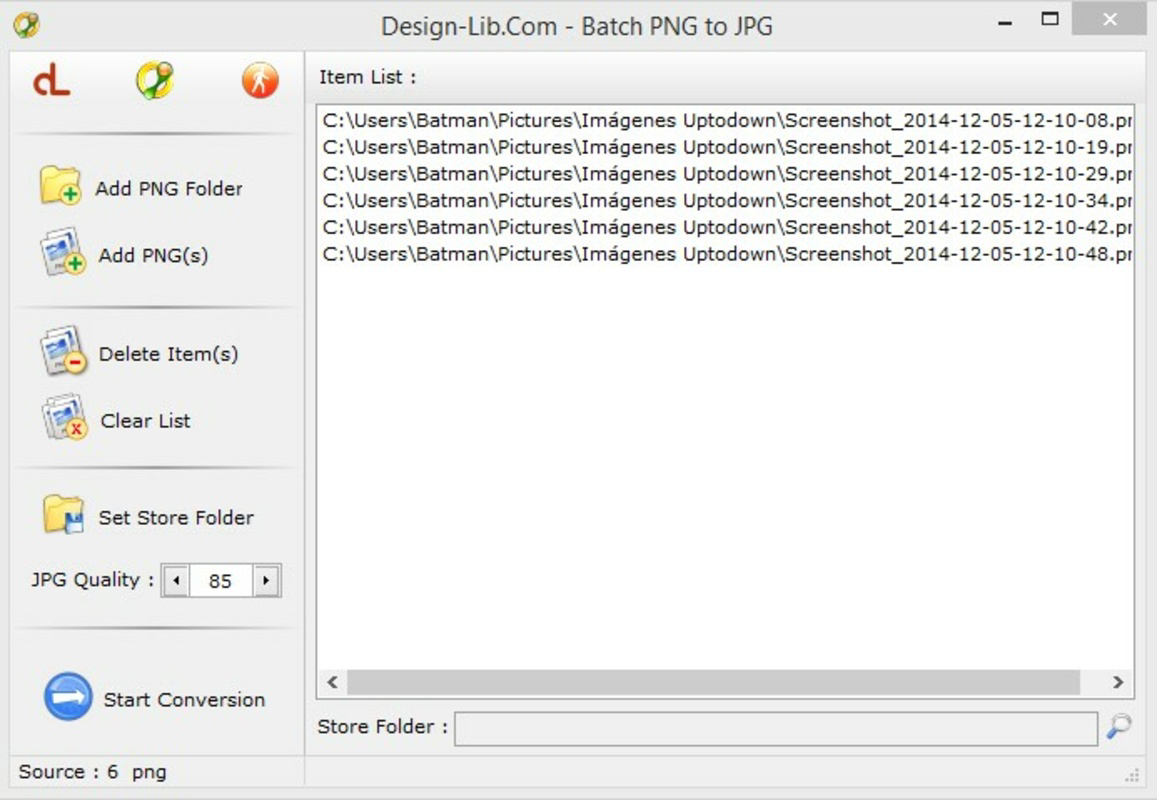
- User-Friendly Interface: With a straightforward layout, users can easily navigate the app and initiate conversions with minimal steps. The interface supports intuitive file selection, reducing the learning curve for new users.
- Quality Adjustments: Users can customize the output quality of the converted JPG files. Lower quality settings reduce file size, which is beneficial for storage or email attachments, while higher settings preserve image clarity for professional use.
- Batch Processing: The ability to process multiple images simultaneously sets this tool apart from basic converters. Users can select entire folders or multiple files at once, significantly cutting down on time and effort.
- Lightweight Design: At only 2.5 MB, the app has a minimal system footprint. It runs efficiently without consuming excessive memory or CPU, allowing smooth operation even during multitasking.
For example, a content creator preparing images for a blog post can select a folder of PNG screenshots, adjust quality to medium, and convert all files in under a minute. Similarly, a photographer archiving project files may use the app to compress PNGs into smaller JPGs for easier sharing.
Interface, UX & Performance
The user interface of Batch PNG to JPG is designed with simplicity and efficiency in mind. It features a clean layout with clearly labeled buttons and minimal visual clutter, allowing users to focus on the core task: image conversion. Navigation is intuitive, with a central file selection area and straightforward controls for initiating batch processing.
Although the developer did not list formal performance metrics, the app’s lightweight nature suggests consistent responsiveness across a range of Android devices. Users on older or mid-tier smartphones should experience smooth operation without lag or crashes. The app maintains stability during batch processing, which is critical when handling large numbers of files.
Performance is further supported by the app’s minimal resource usage. It does not require high-end hardware or extensive background services, making it accessible to a broad audience. The conversion process is handled efficiently in the foreground, with no noticeable delays during file selection or output generation.
Platform Compatibility & Technical Requirements
Batch PNG to JPG is available exclusively on the Android platform. The current version is 1.0.1, with a file size of 2.5 MB. The app is free to download and use, making it accessible to a wide range of users.
The developer did not specify minimum OS requirements or compatibility details. As such, users should ensure their device meets standard Android functionality for running basic utility apps. The app’s lightweight design suggests it may run on devices with older Android versions, though official support is not confirmed.
Pros and Cons
Pros
- Fast and efficient batch conversion of PNG to JPG images
- Simple, intuitive interface suitable for non-technical users
- Adjustable output quality to balance file size and image clarity
- Lightweight design with minimal impact on device performance
- Free to download and use with no in-app purchases
Cons
- Developer did not provide detailed compatibility or system requirements
- No support for other image formats beyond PNG to JPG conversion
- Limited to Android platform; no iOS availability mentioned
- No cloud integration or automatic backup features
- Basic functionality without advanced editing tools
FAQ
Is Batch PNG to JPG safe to download and use?
The app is free and available through official Android channels. As it does not require special permissions and operates locally, it poses minimal risk to user data. However, users should always download from trusted sources.
Can I convert JPG images to PNG using this app?
No, the app is designed exclusively for converting PNG images to JPG format. It does not support reverse conversion or other image format transformations.
Does the app support batch conversion of folders?
Yes, users can select entire folders containing PNG files for simultaneous conversion, making it ideal for handling large collections efficiently.
Is the app compatible with older Android devices?
The developer did not specify minimum OS requirements. However, the app’s small size and lightweight design suggest it may run on older Android versions, though compatibility is not guaranteed.
Are there any updates or future features planned?
The developer has not announced any future updates or feature enhancements. The app remains stable with its current functionality.
Final Thoughts
Batch PNG to JPG delivers a focused, reliable solution for users needing to convert multiple PNG files into JPG format quickly and efficiently. Its lightweight design, intuitive interface, and adjustable quality settings make it a valuable tool for photographers, designers, and everyday users managing image files on Android. While it lacks advanced features or cross-platform availability, its simplicity and performance are strengths in a niche category.
For those seeking a secure, free, and fast way to handle bulk image conversions on their smartphone, this app stands out as a dependable utility. It fills a specific need without unnecessary complexity.
Download Batch PNG to JPG now
Guides & Tutorials for Batch PNG to JPG
How to install Batch PNG to JPG
- Click the Preview / Download button above.
- Once redirected, accept the terms and click Install.
- Wait for the Batch PNG to JPG download to finish on your device.
How to use Batch PNG to JPG
This software is primarily used for its core features described above. Open the app after installation to explore its capabilities.
User Reviews for Batch PNG to JPG 0
No reviews found


